

How to Self Publish Your Book on Amazon ( Kindle Direct Publishing)
Posted on November 3, 2025
How to Self-Publish a Book on Amazon (Beginner-Friendly Guide)
If God placed a book on your heart, there’s a reason. Amazon KDP (Kindle Direct Publishing) gives you a simple way to share your message with the world—without waiting on a traditional publisher to “approve” what God already assigned you to do. With KDP, you can upload your manuscript, design your book cover, and publish your book worldwide while earning royalties. This guide will walk you through each step with clarity and peace, so you can move forward in obedience and confidence.
Step 1: Prepare Your Manuscript
Before you hit publish, take time to polish the gift God entrusted you with. Excellence matters. Your words carry purpose and will reach people—so present them with care.
You’ll need:
- A fully edited and proofread manuscript
- A Word document or PDF for paperback; EPUB for eBook
- Clear chapters, headings, and clean formatting
And if formatting isn’t your strong area, don’t stress. You can hire help or use Amazon’s free tool, Kindle Create, to make the process easier. God doesn’t require perfection—just stewardship.
Step 2: Create or Upload Your Book Cover
Your book cover is your first chance to speak to the hearts of the people God assigned to your voice. It should reflect the message and spirit of your book.
Cover options include:
- DIY tools like Canva
- Freelancers on Fiverr or Upwork
- A professional book designer (best for polished, bookstore-quality results)
Amazon provides sizing templates based on your page count—just follow the guide so everything fits properly.
Step 3: Set Up Your KDP Account
Go to https://kdp.amazon.com and log in with your Amazon account.
You’ll be asked for:
- Your author name & short bio
- Tax and payment info
- Bank details to receive royalties
Once this is set up, you’re free to publish as many books as you desire.
Step 4: Upload Your Book to KDP
Inside your KDP dashboard, click “Create a New Title” and upload:
- Your book details (title, subtitle, description, categories, keywords)
- Your manuscript
- Your cover
Pro Tip: Write a book description that speaks to the reader’s heart, not just their head. Let them know how your book will help, encourage, teach, or transform them.
Step 5: Choose Your Pricing and Royalty
Amazon gives two royalty options:
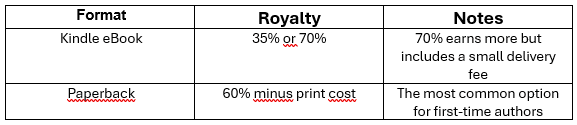
Many new authors start with:
- eBook: $2.99–$5.99
- Paperback: $9.99–$19.99
Choose pricing that feels fair, accessible, and aligned with your audience.
Step 6: Publish & Promote with Intention
Once you click “Publish,” Amazon will review your book within 24–72 hours. After approval, your book is live and available worldwide.
Publishing is the seed.
Promotion is the watering.
If God gave you a message, there are people waiting for it—but they won’t know your book exists unless you share it.
Ways to promote with grace:
- Share your author journey and testimony on social media
- Create your Amazon Author Central page
- Ask early readers for honest reviews
- Share value and excerpts on TikTok, Facebook, Instagram
Show up with heart, not pressure. God will guide the reach.
Quick Tips for First-Time Authors
- Start with one format first (paperback or eBook) to avoid overwhelm
- Choose categories with lower competition
- Use keywords your readers would actually search
- Add A+ Content to make your Amazon page stand out
Frequently Asked Questions
Do I need an ISBN for my book?
No. Amazon provides a free ISBN for paperbacks. If you want to publish outside Amazon, you may prefer to buy your own.
How much does it cost to self-publish on Amazon?
Amazon is free to use. Your only expenses may be editing, formatting, and your book cover.
Can I publish from outside the U.S.?
Yes. KDP is available in most countries and pays authors worldwide.
How long does publishing take?
Usually 24–72 hours after uploading your files.
Can I update my book later?
Yes. You can revise and upload a new version anytime.
About the Author
Lashandri Foxx is a faith-led self-publishing consultant and the founder of Foxx Digital Solutions. She helps new and aspiring authors publish and market their books with clarity, strategy, and spiritual alignment. Her mission is to make the publishing journey simple, spirit-led, and profitable so authors can confidently walk out the divine assignment placed within them.
Ready to Start Your Publishing Journey with Support?
If you’re ready to publish your book with guidance, peace, and confidence, Foxx Digital Solutions offers editing, formatting, publishing, and marketing support.
You don’t have to figure this out alone. Let’s walk this out together — with grace and God-led strategy.
Get in Touch
I’m here to help you publish, market, and grow with authenticity and ease. Ready to schedule your book marketing consultation, chat about author branding, or start your self-publishing journey?
Reach out today, and let's take your next step together.
Contact Me
Contact
[email protected]